A tool to make git worktrees effortless
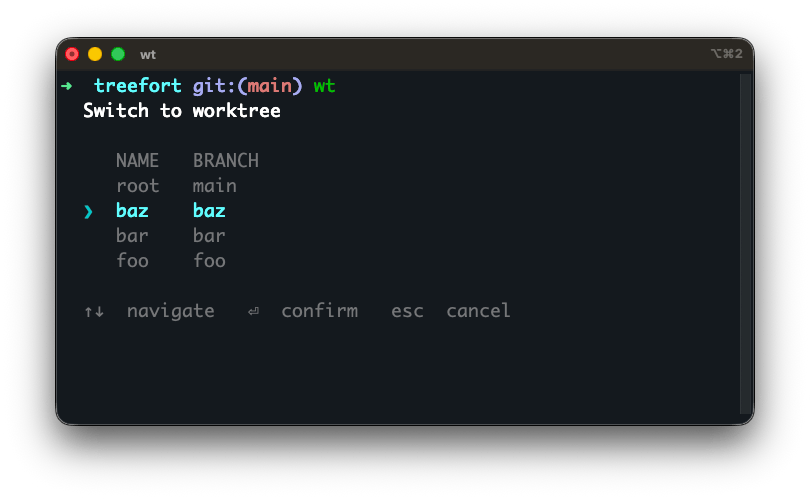
Git Worktrees are great; they let you check out multiple branches at once, each in its own directory. They’ve been around since 2015, but AI has recently skyrocketed their use so that multiple agents can work simultaneously without stepping on each other’s toes.
The raw git worktree commands are clunky. You have manage the file path of each worktree yourself:
- come up with the paths
- remember the paths
cdback and forth between them- clean them up yourself when you’re done
That’s not the end of the world, but it’s an annoying amount of typing and remembering. We can do better!
Introducing
It’s a tool I built with the goal of making worktrees effortless. It handles all the cding for you, lets you choose worktrees from an interactive prompt (no typing), and supports smart partial name matching (less typing).
wt                   # switch with an interactive prompt, ordered by frecency
wt add feature-x     # create it, automatically cd'd into it   --> pwd: /repo/.worktrees/feature-xwt @                 # jump back to the root worktree          --> pwd: /repo                     # `wt root` is equivalent
wt feat              # jump back to feature-x later            --> pwd: /repo/.worktrees/feature-xwt rm                # gone instantly, files deleted async     --> pwd: /repo
No paths to remember. No cd ../../worktrees/whatever. It “just works”.
The most annoying part about git worktrees is having to remember where they are and cd ../../myworktree between them every time.
wt, wt add, and wt cd all drop your shell straight into the right directory. You never think about where the thing lives, because you’re already standing in it. Choose the one you want from the interactive picker or a short version of the name.
Partial + frecency matching, like zoxide for worktrees
Section titled: Partial + frecency matching, like zoxide for worktreesI have another post on a tool I really like called zoxide, and I stole its best idea for treefort. You don’t have to type full names. You type a fragment and wt figures out what you mean:
# matches regularExpressionParser# or codeFirstEndpointRegistry# or coreRegularizerwt regWhen a fragment matches more than one worktree, wt picks the one you actually mean, ranked by frecency — how frequently and recently you’ve visited it. The worktrees you live in float to the top and the ones you forgot about sink. It’s the same mind-reading algorithm that zoxide uses, just pointed at worktrees instead of directories.
Forgot the name entirely? Run wt with no arguments and pick from a list. Same for wt rm.
Worktrees live inside the repo, where they belong
Section titled: Worktrees live inside the repo, where they belongGit doesn’t care at all where you put the worktrees. But you do. Scattering worktrees as siblings of the repo (or somewhere else entirely) is an organizational mess. Put them inside the repo and the new worktree will show up as added files in the root worktree.
Treefort opts for inside the repo, and automatically configures a global gitignore for you to avoid the double-tracking problem (wt install).
A fresh worktree starts out with only what git tracks, so your gitignored .env files stay behind and your dev server errors out.
wt add fixes that automatically: it scans the main worktree and copies every .env* file it finds into the new worktree at the same relative path. No flags, no config, no extra thought. It “just works”.
It can run quick commands in other worktrees
Section titled: It can run quick commands in other worktreeswt exec <command> will run any terminal command in the root worktree. wt exec <name> -- <command> can run a command in some other worktree.
wt ff is a special shorthand command to fast-forward pull (git pull --ff-only) the branch the root worktree has checked out (which we assume is typically main).
Removing worktrees is annoying because you have to sit there while your terminal chugs through synchronously deleting everything in node_modules.
wt rm deregisters the worktree and moves it out of the way instantly, then deletes the files in the background. Your prompt comes back now, not in 30 seconds later.
wt rm feature-x # or a partial — it'll ask y/n before removing a fuzzy matchwt rm # no args: suggests the tree you're inAuto-branch cleanup that won’t lose your work
Section titled: Auto-branch cleanup that won’t lose your workwt rm also deletes the worktree’s local branch when it’s safe to do so, meaning the branch’s commits already live on somewhere else. If the changes exist nowhere but here, the branch is kept and you don’t lose anything. It even catches squash merges by checking patch-equivalence against the trunk.
And when you’ve shipped a whole batch of work, wt prune sweeps out every worktree whose branch is already merged into main (true merges and squash merges alike) leaving just the stuff you’re still working on.
Requirements:
- A version of git released after 2015 (lol)
- Bun installed globally
- Using zsh or bash as your shell
# Create a global `wt` commandnpm i -g treefort
# Set up the shell wrapper + global gitignore (one time)wt install
wt install adds a shell wrapper to your ~/.zshrc or ~/.bashrc and makes sure .worktrees/ is in your global git excludes. Open a new shell and you’re off to the races!
The full command reference and flags live in the README on GitHub. I wish you a treely great experience!